Emoji Wiki: How to Find the Perfect Emoji
Why an Emoji Wiki Matters
There are currently over 3,600 emojis in the Unicode Standard. Three thousand six hundred. And that number keeps growing with each annual update. Unless you have an exceptional memory, you're not going to remember all of them—let alone their names, meanings, and variations.
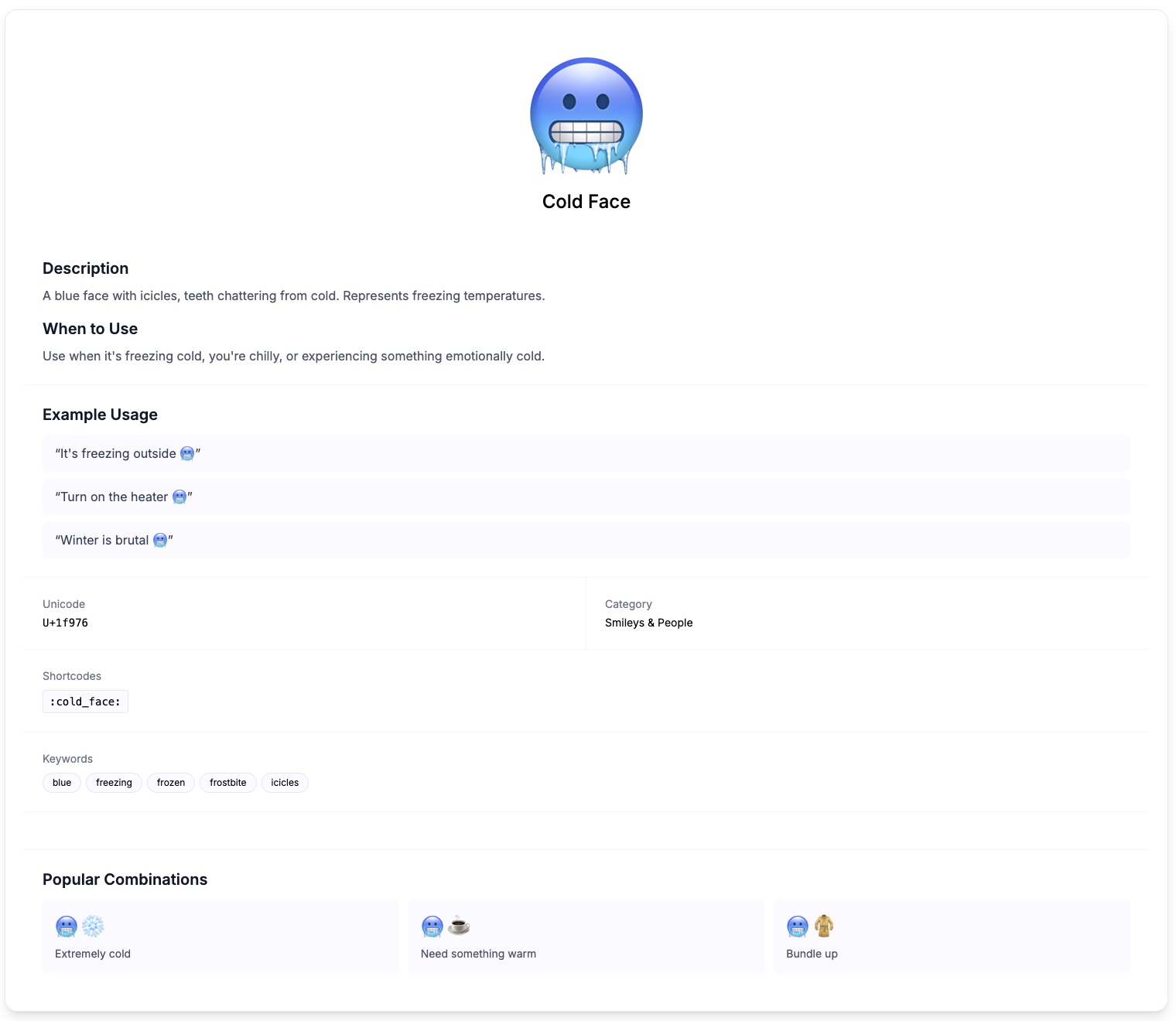

That's where an emoji wiki becomes essential. It's not just a list; it's a searchable, organized reference that helps you find exactly what you need. I use our wiki constantly, even though I consider myself fairly emoji-literate. There's always some obscure symbol I've forgotten or never knew existed.
Think of it like a dictionary, but for the visual language that now peppers basically every digital conversation. And unlike paper dictionaries, you can search it, browse it, and discover new entries without reading cover to cover.
Navigating the Wiki Structure
Our emoji wiki is organized by categories, which mirrors how the Unicode Consortium (the organization that standardizes emojis) structures them. Understanding these categories helps you browse more effectively.
Smileys & Emotion
The classics: 😀😂😢😡🥰 and dozens more. Sub-divided into:
- Faces with positive emotions
- Faces with negative emotions
- Faces with neutral expressions
- Costume and fantasy faces
- Gesture and body parts
People & Body
Human figures, hands, and body parts: 👋👆✌️💪🦶. Includes skin tone modifiers and gendered variations. This category has exploded in recent years to improve representation.
Animals & Nature
From 🐶 to 🦠. Every creature and natural element you might want: mammals, birds, insects, plants, weather, celestial objects. I find myself in this category more often than you would expect—there's an animal or flower for almost every metaphor.
Food & Drink
🍕🍔🍎🍷 and so many more. Divided by type: fruits, vegetables, prepared foods, drinks, sweets. The food category is weirdly complete. Want a dumpling? 🥟. Flatbread? 🫓. There's even a fondue emoji now: 🫕.
Travel & Places
Transportation (🚗✈️🚀), buildings (🏠🏢🏰), maps and geography. If you're talking about going somewhere or being somewhere, this category has you covered.
Activities
Sports, games, arts, and hobbies: ⚽🎮🎨🎭. Also includes events like 🎉 and award emojis like 🏆.
Objects
The catch-all for things: 📱💡🔧📦. Office supplies, tools, clothing, musical instruments. Some useful, some bizarrely specific (🪤 is a mousetrap).
Symbols
Hearts, arrows, signs, and technical marks: ❤️➡️⚠️™️. Also includes keycap numbers, letters, and geometric shapes. These are often overlooked but extremely useful for emphasis and organization.
Flags
Every country flag (🇺🇸🇬🇧🇯🇵🇧🇷) plus regional flags and special flags like 🏳️🌈. There are over 250 flag emojis alone.
Search Tips and Tricks
Typing keywords into the search bar is the fastest way to find emojis. But search works better when you understand how emoji names and metadata are structured.
Use Official Names
Each emoji has an official Unicode name. "Face with Tears of Joy" (😂) won't show up if you search "LOL face." Try searching the actual description: "tears," "joy," or "laughing."
That said, our wiki also indexes common aliases. Searching "laughing" will find 😂 even though the official name doesn't include that word.
Search by Function, Not Just Appearance
Looking for something to represent agreement? Try searching "agree" or "yes"—you'll find 👍✅🙆 and others. Searching "positive" or "approval" might surface additional options.
This approach often reveals emojis you wouldn't have thought of. I searched "celebration" expecting 🎉 and discovered 🥳🪅🎊 as well.
Use Descriptive Keywords
"Red fruit" brings up 🍎🍒🍓. "Yellow animal" finds 🐥🐤🐝🦁. Combining color and category keywords narrows down large sets quickly.
Check Plural and Singular Forms
"Heart" and "hearts" might return different results depending on how emojis are named. If one form doesn't find what you want, try the other.
Browse When You're Stuck
If searching isn't working, switch to browsing. Sometimes you don't know what you're looking for until you see it. Scanning through a relevant category often triggers recognition: "Oh, that's the one!"
Understanding Emoji Meanings and Context
But emojis don't have fixed meanings. Their definitions shift based on context, culture, age group, and platform. The wiki provides official descriptions, but real-world usage often diverges.
Official vs. Actual Meaning
Take 💀. Officially, it's "Skull"—meant to represent death, danger, or poison. In actual usage circa 2024? It means "I'm dead" (from laughter). Young people use it more than 😂 now. Same symbol, completely different vibe.
The wiki documents these shifts when they become widespread enough. But always consider your audience. Sending 💀 to your boomer boss who interprets it literally might cause confusion.
Platform Differences
Apple's 😬 (grimacing face) looks noticeably different from Google's version. Samsung's emoji designs have their own distinct style. An emoji can communicate subtly different emotions depending on which platform it renders on.
Our wiki shows platform comparisons where available. If precise interpretation matters—like for professional communication—check how your emoji renders on the recipient's likely device.
Cultural Considerations
🙏 means "please" or "thank you" (praying hands) in Western contexts. In Japan, it's more commonly used as an apology or greeting. 👍 is positive almost everywhere, but in some Middle Eastern cultures, it's an insult.The wiki includes cultural notes for emojis with significant regional variations. Read these before using unfamiliar emojis in international communication.
Age and Generational Differences
Some emojis have developed generational connotations. Younger users associate 😊 with passive-aggressiveness or irony. 👍 from someone under 25 might be dismissive rather than supportive. 💀 and 😭 are used almost interchangeably for "extremely funny" by Gen Z.
I don't think there are hard rules here—it depends on individual relationships—but awareness helps. If something feels off in how someone responds to your emojis, generational interpretation gaps might explain it.
The Copy and Paste Process
Every emoji in the wiki can be copied with a single click. Here's how to use them effectively:
Desktop
Click any emoji to copy it to your clipboard. Then Ctrl+V (or Cmd+V on Mac) to paste wherever you want. Works in browsers, documents, emails, most applications. Some older software might not render all emojis, but that's increasingly rare.
Mobile
Tap to copy. Emojis enter your clipboard just like copied text. Paste as usual. Most mobile keyboards also have built-in emoji pickers, but the wiki is faster when you know what you want.
Accessibility Tip
Screen readers announce emojis by their official names. Pasting "Great job! 👍" will be read as "Great job! Thumbs up." Be mindful of how many emojis you use in content that might be read aloud—excessive emojis disrupt the listening experience.
Emoji Combinations and Sequences
Some emojis work together to form new meanings. The wiki catalogs popular combinations.
ZWJ Sequences
Zero Width Joiner (ZWJ) sequences combine multiple emojis into one. 👩🍳 (woman cook) is technically 👩 + ZWJ + 🍳 rendered as a single glyph. The wiki shows both the combined result and the components.
These are technically single emojis now (they have their own Unicode code points), but understanding the underlying structure helps you find related combinations.
Creative Combinations
People create meaning by placing emojis adjacent to each other:
- 🌧️😢 = sad because of bad weather
- 🍕❤️ = love pizza
- 📈🚀 = going up dramatically
- 🐄💨 = um, use your imagination
The wiki includes a section on popular combination patterns. These aren't official—they're organic inventions by users—but they've become recognizable shorthand.
Skin Tone and Gender Modifiers
Many human emojis support modifiers for skin tone (🏻🏼🏽🏾🏿) and gender variations. The wiki shows all available versions and explains how to input them.
Not all platforms support all combinations. The wiki notes known compatibility issues so you don't send a modifier that renders as two separate symbols on the recipient's device.
Hidden and Lesser-Known Emojis
One of my favorite things about browsing the wiki is discovering emojis I didn't know existed.
Symbols Section Gems
🔰 (Japanese symbol for beginner) is great for marking newbie content. ⚜️ (fleur-de-lis) adds elegance. ☯️ (yin yang) works for balance-related messages.
Obscure Animals
🦔 (hedgehog), 🦙 (llama), 🦫 (beaver)—the animal category keeps expanding. There's 🪿 (goose) as of 2022.
Technical Symbols
🔘 (radio button), 🔳 (white square button), 🔲 (black square button) are useful for creating formatted content. 📛 (name badge) works for introductions.
Regional Indicators
These are letter-pair combinations that render as flags: 🇺🇸 is U+S. You can technically create flags for any two-letter country code. The wiki shows valid combinations and explains why some codes don't have associated flag emojis.
Keeping Up with New Emojis
Unicode releases new emojis annually, usually finalized in September and rolling out to devices over the following year. Recent additions include:
- 2023: 🪼 (jellyfish), 🫨 (shaking face), 🪻 (hyacinth), 🫷🫸 (pushing hands)
- 2022: 🫠 (melting face), 🫵 (index pointing at viewer), 🪺 (nest with eggs)
- 2021: 🫤 (face with diagonal mouth), 🫣 (face with peeking eye)
Our wiki updates with each release. New emojis are flagged in the interface so you can discover them before they become mainstream.
Why Updates Matter
Using a new emoji before it's widely supported results in ⬜ (blank square) on older devices. The wiki includes adoption timelines: when each emoji was added and which major platforms support it.
As a rule, wait about 12-18 months after a Unicode release before using new emojis in critical communication. By then, most people will have updated their systems.
Building Emoji Fluency
Like any language, emoji fluency develops through practice and exposure. Some suggestions:
Browse Regularly
Spend a few minutes a week in the wiki just exploring categories. You'll absorb options passively, making them available when you need them later.
Note What Others Use
When you see an effective emoji in someone else's message, note it. If you don't recognize it, look it up. This builds contextual understanding alongside vocabulary.
Experiment in Low-Stakes Situations
Casual conversations with friends are the place to try new emojis. If something lands weirdly, you'll learn and adjust.
Pay Attention to Trends
Emoji usage evolves constantly. What's common now might feel dated in two years. Staying loosely aware of trends—through social media observation or trend reports—keeps your emoji game current.
So, Is It Worth Playing?
The emoji wiki isn't just a reference—it's a tool for expanding how you communicate digitally. With thousands of symbols available, there's almost always a more precise emoji than the one you first think of.
Use the search smartly. Browse intentionally. Pay attention to meaning beyond the official definitions. And don't be afraid to discover emojis you never knew existed.
Language evolves, and emojis are now part of that evolution. A good wiki keeps you fluent.
Sources & Further Reading
- Unicode Full Emoji List — official reference from the Unicode Consortium
- Emojipedia — platform comparisons and emoji changelog
- Unicode Consortium — the organization behind the emoji standard
Last updated: February 2026
Written by ACiDek
Creator & Developer
Developer and emoji enthusiast from Czech Republic. Creator of emodji.com, building tools and games that make digital communication more fun since 2024. When not coding, probably testing which emoji combinations work best for different situations.
More articles by ACiDek →Explore Emoji Wiki
Discover detailed meanings, usage examples, and cultural context for popular emoji in our emoji wiki. Each entry includes usage tips, combinations, and platform differences.
Emoji Tools
Put what you learned into practice with our free emoji tools.